Waiting to Get Your Dissertation Accepted?

 one-on-one support



To format your text paragraphs in your papers, you will need to follow a few APA guidelines so that their appearance will be consistent. Consistency in size of paragraphs means that paragraphs are more than one sentence long. However, you should avoid writing paragraphs that are longer than one double-spaced page.
APA Paragraph Format: Indention
The rules for indention do not apply to the abstract. The abstract is not indented. Usually, abstracts are to be left-aligned as a single paragraph.
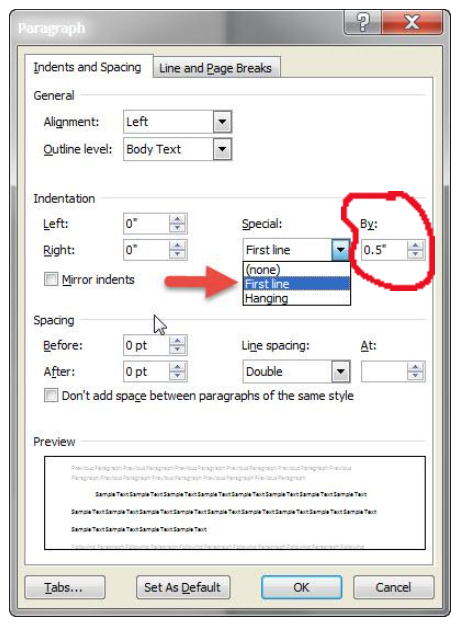
All the paragraphs in the body of the paper need to be indented 0.5in. (1.27cm) from the left side of the page. To set up an automatic first line indent in Microsoft Word, access Paragraph formatting options. Under “Indentation,” choose “Special,” then choose “First line” and set the indent under “By” to 0.5 in. or 1.27 cm.
APA Paragraph Format: Alignment and Spacing
Left-align the paragraphs so that the right side has a ragged edge. Double space all your paragraphs, and do not leave extra spacing between paragraphs. Also, use one space after the end-of-sentence punctuation.
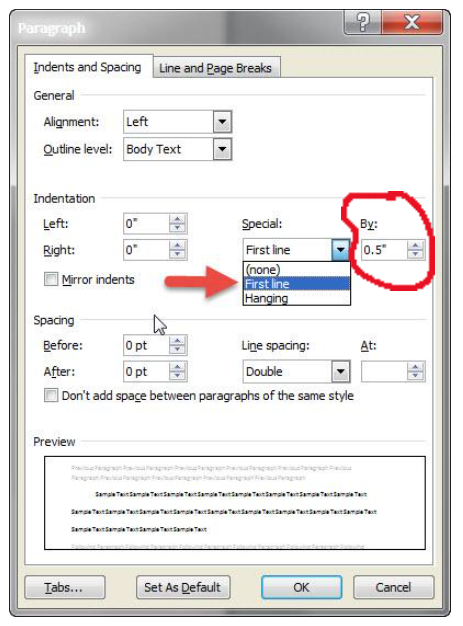
To left align your paper in Microsoft Word, go to the Paragraph section on the Home tab. Then, in the Alignment drop down section, choose “Left,” and for Outline Level, choose “Body Text.” In the Spacing section under line spacing, choose “Double.”
Get Your Dissertation Accepted On Your Next Submission

Next, to avoid leaving extra spacing between paragraphs, click on the box next to “Don’t add space between paragraphs of the same style.”
APA Paragraph Format: Fonts
The 7th edition of APA does not require you to only use Times New Roman 12-point font. Acceptable font options for printed text are sans serif fonts, such as 11-point Arial, 11-point Calibri, and 10-point Lucida Sans Unicode. The serif fonts you can use are 12-point Times New Roman, 11-point Georgia, and normal 10-point Computer Modern, which is the font used for LaTeX. You should use the same font and size in all your paragraphs.
APA Paragraph Format: Long Direct Quotations
Long direct quotations are those with at least 40 words of text that is quoted word-for-word from a source other than yourself. Place them in a block quote of lines without quotation marks. Start the quotation on a new line and indent 0.5in/1.27cm from the left margin. Type the quotation using double-spacing.
Example:
Effective paragraphs guide readers through the information by having explanations and supportive evidence for each claim or argument that is made. The main point in each paragraph is stated in a topic sentence, which indicates what the paragraph entails. Research shows that students often do not provide the appropriate evidence in each paragraph. For example, Broady (2019) asserted the following:
The evidence students provide in research papers consists of many forms, such as direct quotations, paraphrases from scholarly sources, and statistical data. Valid evidence helps to support their claims and arguments. However, many students do not incorporate information from several different sources into each of the main paragraphs. Educators have found it necessary to reiterate to their students that it is preferred to avoid providing information from only a single author or article. (p. 24)
If your quotation has more than 2 paragraphs, indent the first line of each additional paragraph, using the tab key.
Note: For more information, refer to the APA publication manual, sections 1.18 – 1.27.